
22 min read
Planning a Poster
Analyse the brief, list and rank the content, sketch thumbnails, and set up the format — before opening Photoshop.
Step 1 — Analyse the Brief
| Questions to answer from the brief | |
|---|---|
Step 2 — List and Rank the Content
Write every piece of text, then sort it into level 1 (hook), level 2 (act on it) and level 3 (supporting), as in the Visual Hierarchy lesson. Cut anything that does not help the purpose.
Step 3 — Sketch Thumbnails
Draw three to six tiny sketches (thumbnails) of different layouts on paper — just boxes and lines. Try the image at the top, on the left, or filling the background. Pick the strongest and draw it larger. Sketching takes minutes and saves hours in Photoshop.
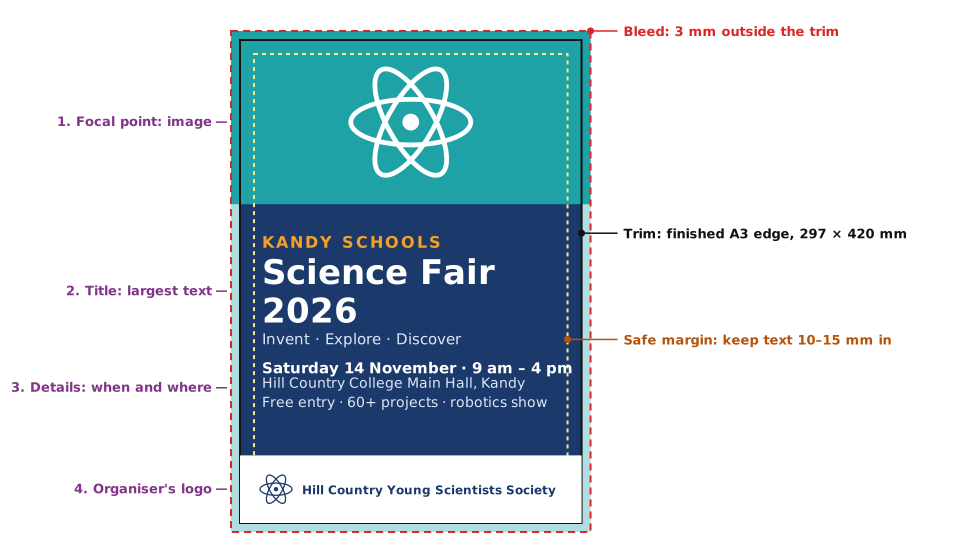
Step 4 — Decide the Technical Format
| Technical specification | ||
|---|---|---|
Practice
Why do printed posters need bleed?
More lessons in Design Principles · Next: Critiquing and Improving a Design · Previous: Brand Consistency