
24 min read
What Makes a Processor Faster
Clock speed, number of cores, cache size, bus width, word size and pipelining — each with an analogy, and what they mean on a spec sheet.
Six Factors
| Factors that affect CPU performance | |||
|---|---|---|---|
Clock Speed
A 4 GHz processor ticks 4,000 million times per second. Doubling the clock speed can almost double the speed of a single task — but it also makes more heat and uses more power. That is why clock speeds have stayed around 3–6 GHz for years, and makers added more cores instead.
Many processors change speed as needed: a base clock for normal work and a higher boost (turbo) clock for short bursts.
Cores and Threads
A multi-core processor has several complete processing units. A 6-core CPU can run six tasks at once — for example antivirus scanning, a video call and a spreadsheet.
More cores only help if the software can share its work between them. Video editing, 3D rendering and servers with many users benefit a lot. A simple word processor does not.
Some CPUs run two threads on each core (called hyper-threading or SMT), which keeps the core busier.
Cache
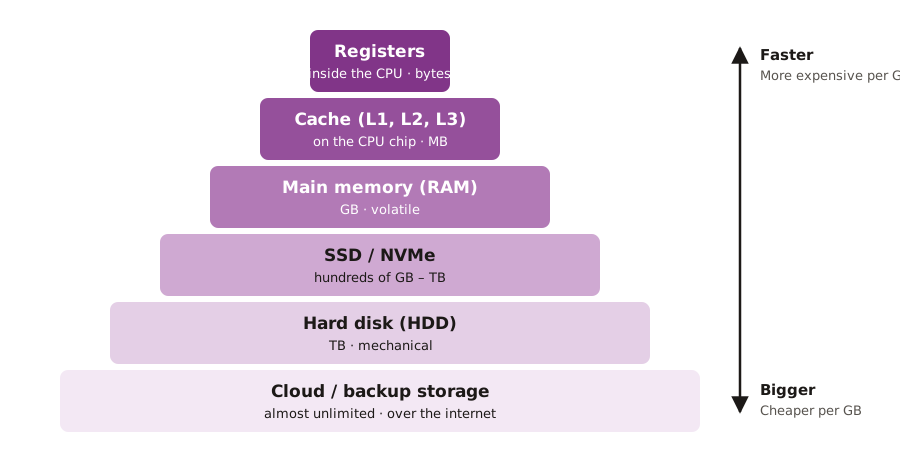
Fetching from RAM is slow compared with the CPU's speed. Cache keeps recently used instructions and data on the chip. A bigger cache means more "hits" — the data is already there — and fewer slow trips to RAM.
Pipelining
Graphics Processing Units
A GPU (graphics processing unit) has thousands of small, simple cores designed to do the same calculation on many pixels at once. Most office computers use the integrated graphics built into the CPU. Design, video editing, 3D work and AI need a dedicated graphics card with its own fast memory (VRAM).
Spec sheet: which is faster for design work?
| PC A | PC B |
|---|---|
| 4 cores, 4.2 GHz, 8 MB cache | 8 cores, 4.0 GHz, 24 MB cache |
| Integrated graphics | Dedicated graphics card with 8 GB VRAM |
| Good for email and documents | Better for design: more cores, more cache, a real GPU — even though the clock is slightly lower |
Practice
More lessons in Computer Hardware and Peripherals · Next: Memory: RAM, ROM and Cache · Previous: The Fetch–Decode–Execute Cycle