
22 min read
Colour Modes: RGB and CMYK
Screens mix red, green and blue light; printers mix cyan, magenta, yellow and black ink. Choose the right mode for the job.
Two Ways to Make Colour
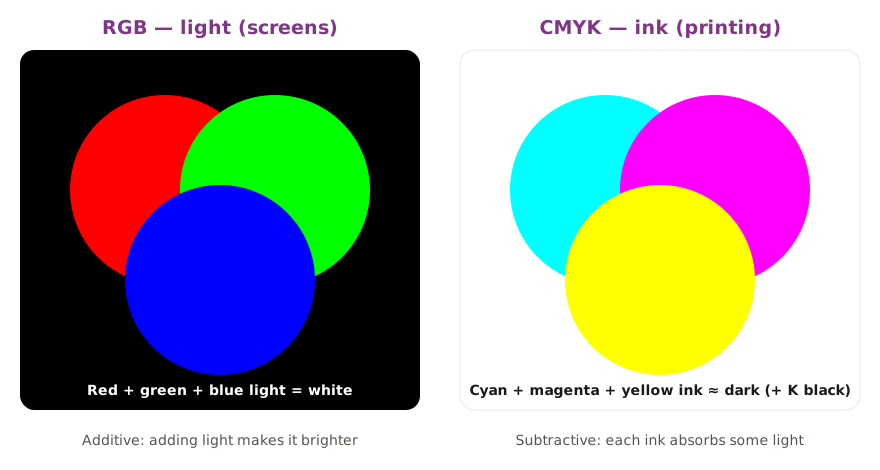
RGB vs CMYK
| RGB | CMYK |
|---|---|
| Additive — light added to black | Subtractive — ink on white paper absorbs light |
| Screens: websites, social media, video, presentations | Printing presses: posters, flyers, brochures |
| Larger range (gamut) — very bright, saturated colours | Smaller range — very bright blues, greens and oranges look duller |
| Values 0–255 per channel, or hex (#1FA2A6) | Percentages of each ink (0–100%) |
Why Colours Change When Printed
Some bright screen colours cannot be made with ink — they are out of gamut for CMYK. When a design is converted to CMYK or printed, those colours shift to the nearest printable colour, often looking duller. Designers check this before printing, not after.
In Photoshop, View → Proof Colors shows a preview of how the design will look in CMYK, and View → Gamut Warning highlights colours that cannot be printed.
Colour mixer (RGB)
Hex: #1FA2A6
rgb(31, 162, 166)
≈ CMYK 81% 2% 0% 35%
The CMYK figures use a simple formula. Real print conversion (for example in Photoshop) uses colour profiles, so the numbers will differ a little.
Which Mode Should You Use?
| Choosing a colour mode | |
|---|---|
Practice
More lessons in Digital Image Fundamentals · Next: Bit Depth · Previous: Image Size and Print Size