
16 min read
The Motherboard
The CPU socket, RAM slots, chipset, expansion slots, storage connectors, firmware chip and rear ports.
The Main Circuit Board
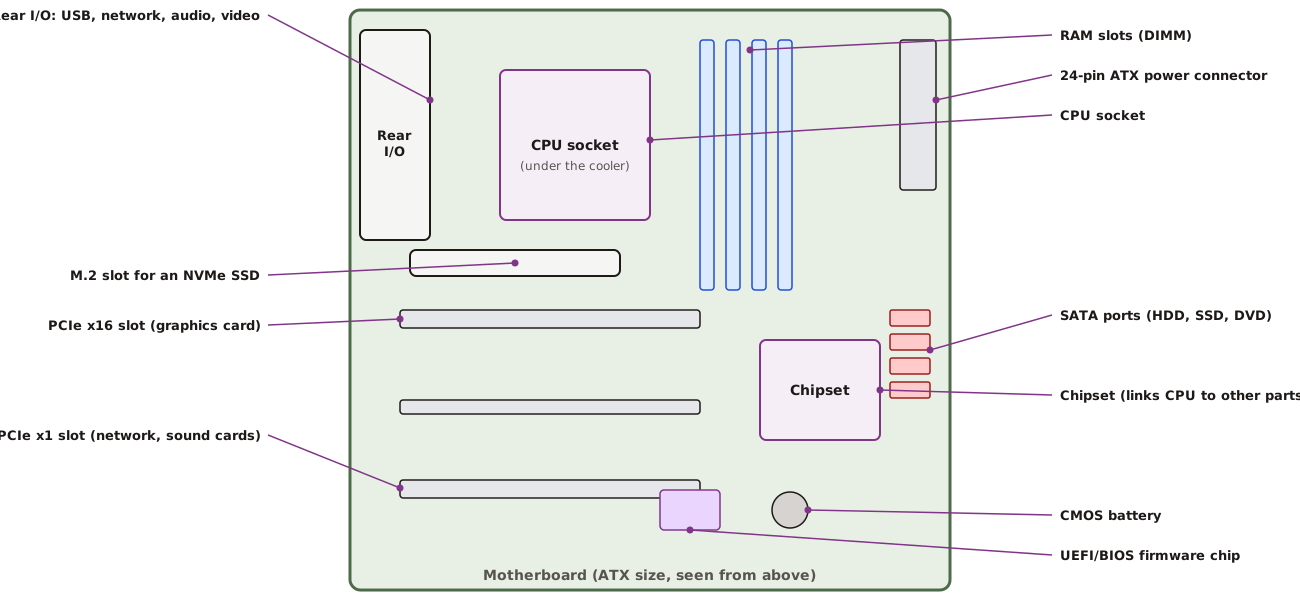
| Motherboard parts and what they do | |
|---|---|
Motherboard Sizes
Common motherboard sizes
| Size | Best for |
|---|---|
| ATX (about 30 × 24 cm) | Towers with many cards and drives; workstations |
| Micro-ATX (about 24 × 24 cm) | Ordinary office desktops — fewer slots, lower cost |
| Mini-ITX (17 × 17 cm) | Small form factor PCs, kiosks and POS units |
Firmware: BIOS and UEFI
When you switch on, the CPU first runs a small program stored on the motherboard's firmware chip. Older computers used BIOS (Basic Input/Output System). Modern computers use UEFI (Unified Extensible Firmware Interface), which starts faster, supports large disks and adds Secure Boot to block unsafe start-up software. Windows 11 needs UEFI with Secure Boot capability and a TPM 2.0 security chip.
You will follow the full start-up process in the Operating Systems course.
Practice
What is stored on the motherboard's firmware chip?
More lessons in Computer Hardware and Peripherals · Next: The Microprocessor · Previous: Inside the System Unit